Documentation Index

Fetch the complete documentation index at: https://docs.modulate.ai/llms.txt

Use this file to discover all available pages before exploring further.

Modulate exposes two API surfaces with different authentication schemes. Most users will use the Velma-2 model APIs; the Modulate Platform API is a higher-level orchestration surface covered at the bottom of this page.
SurfaceHostAuth
Velma-2 model APIsmodulate-developer-apis.comX-API-Key header (HTTP) / api_key query param (WebSocket)
Modulate Platform APIcloud-processing-api.modulate.aiaccountuuid + apikey headers

Velma-2 model APIs

All Velma-2 endpoints require authentication via an API key. This section covers how to pass your key correctly for each endpoint type, what errors to expect when authentication fails, and how rate limiting works.

API keys

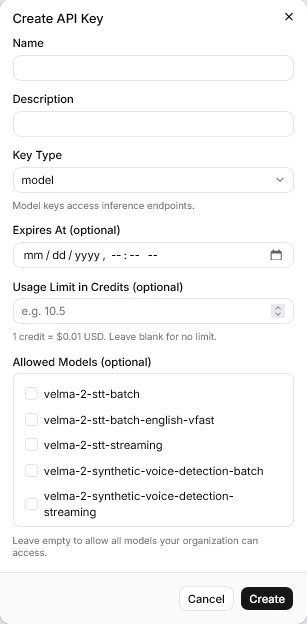
API keys can be generated in the web interface or via the Admin Console APIs. API keys are tied to your organization and determine your access to models and your usage limits. These settings cannot be changed once an API key is generated.
API key creation screen

Passing your API key

The method differs depending on whether you are using an HTTP or WebSocket endpoint.

HTTP batch endpoints

Include your key in the X-API-Key request header on every request.
X-API-Key: YOUR_API_KEY
Affected endpoints:
  • POST /api/velma-2-stt-batch
  • POST /api/velma-2-stt-batch-english-vfast
  • POST /api/velma-2-synthetic-voice-detection-batch
  • POST /api/velma-2-pii-phi-redaction-batch

WebSocket streaming endpoints

Pass your key as the api_key query parameter when opening the connection. It cannot be passed as a header after the WebSocket handshake.
wss://modulate-developer-apis.com/api/velma-2-stt-streaming?api_key=YOUR_API_KEY
wss://modulate-developer-apis.com/api/velma-2-synthetic-voice-detection-streaming?api_key=YOUR_API_KEY&audio_format=s16le&sample_rate=16000&num_channels=1
Affected endpoints:
  • wss /api/velma-2-stt-streaming
  • wss /api/velma-2-synthetic-voice-detection-streaming
  • wss /api/velma-2-pii-phi-redaction-streaming
API keys in WebSocket URLs may appear in server access logs. Where possible, avoid logging or persisting the full connection URL.

Authentication error codes

HTTP endpoints

StatusMeaning
401Invalid or missing API key
403Valid key, but model access is not enabled for your organization, or a usage limit has been exceeded
The SVD Batch endpoint returns 403 for both unauthorized keys and exceeded usage limits, rather than a separate 401. Check the detail field in the error response body to distinguish the cause.

WebSocket endpoints

Authentication failures during the WebSocket handshake result in a close code rather than an HTTP status.
Close codeMeaning
4001Invalid API key (STT Streaming)
4003Model access not enabled, or usage denied (STT Streaming)
4003Authentication failed or usage denied (SVD Streaming)

Rate limits

Two independent limits apply to each endpoint per organization: Concurrent request limit — the number of requests or connections that can be in-flight simultaneously. Submitting a new request beyond this limit results in an immediate error rather than queuing. Monthly usage limit — measured in audio hours processed. Once the monthly limit is reached, further requests are rejected until the limit resets. Limit values are set per organization and per model. Contact your administrator to review or raise your limits.

Rate limit error codes

Endpoint typeStatus / codeMeaning
STT Batch429Monthly usage or concurrent request limit exceeded
STT English VFast429Monthly usage or concurrent request limit exceeded
SVD Batch403Monthly usage or concurrent request limit exceeded
STT StreamingClose code 4029Monthly usage or concurrent connection limit exceeded
SVD StreamingClose code 4003Usage denied (includes rate limits)

Retry guidance

When you receive a rate limit error:
  • Concurrent limit hit — wait a short interval (a few seconds) and retry. The limit frees up as in-flight requests complete.
  • Monthly limit hit — no retry will succeed until the monthly period resets. Contact your administrator or update this in Organization settings.
For batch workloads where you control concurrency (e.g., processing a large file backlog), use a semaphore or connection pool to stay within your concurrent limit rather than relying on retry loops.
import asyncio
import aiohttp

MAX_CONCURRENT = 5  # set to your organization's concurrent limit
semaphore = asyncio.Semaphore(MAX_CONCURRENT)

async def transcribe_file(session, filepath):
    async with semaphore:
        # ... your request here
        pass

Modulate Platform API

The Modulate Platform API (cloud-processing-api.modulate.ai) is the orchestration surface for submitting jobs that combine transcription with optional analysis features (emotion, demographics, synthetic-voice detection, behavioral insights). It uses a different auth scheme from the Velma-2 model APIs.
The Platform API is currently in early access. Significant changes are planned before 1.0.0 — expect any part of the contract to change. See the API Reference → Modulate Platform API tab for the current schema.

Authentication headers

Every Platform API request requires two headers:
accountuuid: YOUR_ACCOUNT_UUID
apikey: YOUR_API_KEY
  • accountuuid — your account’s UUID, available from your account administrator or the Platform dashboard.
  • apikey — your Platform API key. This is separate from your Velma-2 model API keys and is issued through the Platform.

Submission types

The Platform API supports three job submission patterns through a single POST /api_service endpoint:
  • Real-time WebSocket — submit with submission_type: "realtime_websocket" and no files. The response returns a realtime_url for streaming via the Pipecat Client SDK.
  • Single-file batch — upload one audio file (≤ 5 MB) in a single POST.
  • Multi-file batch — POST each file in turn with the same job_id; set finalize_job: true on the final upload.
For all three patterns, poll GET /api_service/job_status/{job_id} until status='completed', then retrieve results from the response. See the API Reference → Modulate Platform API tab for full request/response schemas.