> ## Documentation Index
> Fetch the complete documentation index at: https://docs.modulate.ai/llms.txt
> Use this file to discover all available pages before exploring further.
# Authentication and rate limits
> How to authenticate Modulate API requests, what rate limits apply, and how to handle auth and rate limit errors.
Modulate exposes two API surfaces with different authentication schemes. Most users will use the **Models API**; the **Modulate Platform API** is a higher-level orchestration surface covered at the bottom of this page.
| Surface | Host | Auth |
| --------------------- | ---------------------------------- | ------------------------------------------------------------- |
| Models API | `platform.modulate.ai` | `X-API-Key` header (HTTP) / `api_key` query param (WebSocket) |
| Modulate Platform API | `cloud-processing-api.modulate.ai` | `accountuuid` + `apikey` headers |
## Models API
All Models API endpoints require authentication via an API key. This section covers how to pass your key correctly for each endpoint type, what errors to expect when authentication fails, and how rate limiting works.
## API keys
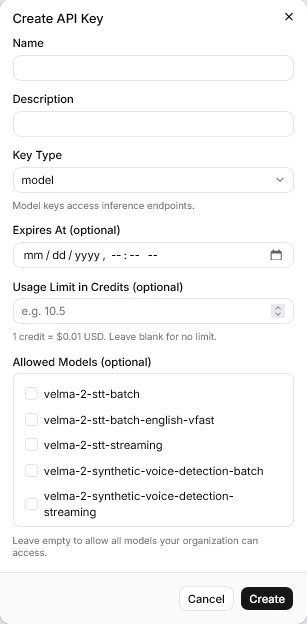
API keys can be generated [in the web interface](https://platform.modulate.ai/dashboard/api-keys).
API keys are tied to your organization and determine your access to models and your usage limits. These settings cannot be changed once an API key is generated.
 ## Passing your API key
The method differs depending on whether you are using an HTTP or WebSocket endpoint.
### HTTP batch endpoints
Include your key in the `X-API-Key` request header on every request.
```http theme={null}
X-API-Key: YOUR_API_KEY
```
Affected endpoints:
* `POST /api/velma-2-stt-batch`
* `POST /api/velma-2-stt-batch-english-vfast`
* `POST /api/velma-2-stt-batch-multilingual-vfast`
* `POST /api/velma-2-synthetic-voice-detection-batch`
* `POST /api/velma-2-pii-phi-redaction-batch`
### WebSocket streaming endpoints
Pass your key as the `api_key` query parameter when opening the connection. It cannot be passed as a header after the WebSocket handshake.
```text theme={null}
wss://platform.modulate.ai/api/velma-2-stt-streaming?api_key=YOUR_API_KEY
wss://platform.modulate.ai/api/velma-2-synthetic-voice-detection-streaming?api_key=YOUR_API_KEY&audio_format=s16le&sample_rate=16000&num_channels=1
```
Affected endpoints:
* `wss /api/velma-2-stt-streaming`
* `wss /api/velma-2-synthetic-voice-detection-streaming`
* `wss /api/velma-2-pii-phi-redaction-streaming`
API keys in WebSocket URLs may appear in server access logs. Where possible, avoid logging or persisting the full connection URL.
## Authentication error codes
### HTTP endpoints
| Status | Meaning |
| ------ | ---------------------------------------------------------------------------------------------------- |
| `401` | Invalid or missing API key |
| `403` | Valid key, but model access is not enabled for your organization, or a usage limit has been exceeded |
The Deepfake Detection batch endpoint returns `403` for both unauthorized keys and exceeded usage limits, rather than a separate `401`. Check the `detail` field in the error response body to distinguish the cause.
### WebSocket endpoints
Authentication failures during the WebSocket handshake result in a close code rather than an HTTP status.
| Close code | Meaning |
| ---------- | -------------------------------------------------------------------------------- |
| `4001` | Invalid API key (Multilingual Transcription streaming) |
| `4003` | Model access not enabled, or usage denied (Multilingual Transcription streaming) |
| `4003` | Authentication failed or usage denied (Deepfake Detection streaming) |
## Rate limits
Three independent limits apply to your usage. They are enforced separately, so hitting one has no effect on the others.
**Concurrent request limit** — the number of requests or connections that can be in-flight simultaneously, applied per model. Submitting a new request beyond this limit results in an immediate error rather than queuing. New accounts start with a limit of 1–5 concurrent streams per model; see [Requesting more concurrency](#requesting-more-concurrency) below to raise it.
**Monthly Usage Quota** — a per-model cap on audio processed each month, set by Modulate for your organization. When a model's quota is reached, further requests to *that model* are rejected until the monthly period resets; other models are unaffected. Your organization cannot change this value directly — submit the [support form](/support#contact-us) to request a higher quota on a specific model.
**Monthly Credit Limit** — an optional, organization-wide cap on total credit spend that you set for yourself. It is **off by default** and has no per-model configuration. When enabled and reached, further processing is blocked across *all* models until an admin raises or removes the limit. An admin controls this value in [Organization settings](https://platform.modulate.ai/dashboard/organization).
### Rate limit error codes
| Endpoint type | Status / code | Meaning |
| -------------------------------------- | ----------------- | ----------------------------------------------------- |
| Multilingual Transcription (batch) | `429` | Monthly usage or concurrent request limit exceeded |
| English Fast Transcription (batch) | `429` | Monthly usage or concurrent request limit exceeded |
| Deepfake Detection (batch) | `403` | Monthly usage or concurrent request limit exceeded |
| Multilingual Transcription (streaming) | Close code `4029` | Monthly usage or concurrent connection limit exceeded |
| Deepfake Detection (streaming) | Close code `4003` | Usage denied (includes rate limits) |
### Retry guidance
When you receive a rate limit error:
* **Concurrent limit hit** — wait a short interval (a few seconds) and retry. The limit frees up as in-flight requests complete.
* **Monthly Usage Quota hit (single model)** — no retry will succeed until the monthly period resets. If you need a higher quota for that model, submit the [support form](/support#contact-us).
* **Monthly Credit Limit hit (all models blocked)** — no retry will succeed until the limit is raised or the monthly period resets. An admin can review or change it in [Organization settings](https://platform.modulate.ai/dashboard/organization).
For batch workloads where you control concurrency (e.g., processing a large file backlog), use a semaphore or connection pool to stay within your concurrent limit rather than relying on retry loops.
```python theme={null}
import asyncio
import aiohttp
MAX_CONCURRENT = 5 # set to your organization's concurrent limit
semaphore = asyncio.Semaphore(MAX_CONCURRENT)
async def transcribe_file(session, filepath):
async with semaphore:
# ... your request here
pass
```
### Requesting more concurrency
The concurrent request limit is adjustable per model from the [Concurrency Limits page](https://platform.modulate.ai/dashboard/concurrency-limits) in your dashboard. New accounts start at 1–5 concurrent streams per model.
* **Up to 25 concurrent streams** — you can raise a model to this ceiling yourself; the increase applies automatically.
* **More than 25** — requests above 25 go to the Modulate team for evaluation. We may follow up for more information about your use case and expected traffic before approving.
Concurrency is separate from your monthly limits — if you're being blocked by a Monthly Usage Quota or Monthly Credit Limit rather than by too many simultaneous requests, raising concurrency won't help.
## Modulate Platform API
The Modulate Platform API (`cloud-processing-api.modulate.ai`) is the orchestration surface for submitting jobs that combine transcription with optional analysis features (emotion, demographics, deepfake detection, behavioral insights). It uses a different auth scheme from the Models API.
The Platform API is currently in **early access**. Significant changes are planned before 1.0.0 — expect any part of the contract to change. See the **API Reference → Modulate Platform API** tab for the current schema.
### Authentication headers
Every Platform API request requires **two** headers:
```http theme={null}
accountuuid: YOUR_ACCOUNT_UUID
apikey: YOUR_API_KEY
```
* `accountuuid` — your account's UUID, available from your account administrator or the Platform dashboard.
* `apikey` — your Platform API key. This is **separate** from your Models API keys and is issued through the Platform.
### Submission types
The Platform API supports three job submission patterns through a single `POST /api_service` endpoint:
* **Real-time WebSocket** — submit with `submission_type: "realtime_websocket"` and no files. The response returns a `realtime_url` for streaming via the [Pipecat Client SDK](https://docs.pipecat.ai/client/js/introduction).
* **Single-file batch** — upload one audio file (≤ 5 MB) in a single POST.
* **Multi-file batch** — POST each file in turn with the same `job_id`; set `finalize_job: true` on the final upload.
For all three patterns, poll `GET /api_service/job_status/{job_id}` until `status='completed'`, then retrieve results from the response.
See the **API Reference → Modulate Platform API** tab for full request/response schemas.
## Related
* [Code examples by language](/guides/code-examples)
* [Troubleshooting](/guides/troubleshooting)
## Passing your API key
The method differs depending on whether you are using an HTTP or WebSocket endpoint.
### HTTP batch endpoints
Include your key in the `X-API-Key` request header on every request.
```http theme={null}
X-API-Key: YOUR_API_KEY
```
Affected endpoints:
* `POST /api/velma-2-stt-batch`
* `POST /api/velma-2-stt-batch-english-vfast`
* `POST /api/velma-2-stt-batch-multilingual-vfast`
* `POST /api/velma-2-synthetic-voice-detection-batch`
* `POST /api/velma-2-pii-phi-redaction-batch`
### WebSocket streaming endpoints
Pass your key as the `api_key` query parameter when opening the connection. It cannot be passed as a header after the WebSocket handshake.
```text theme={null}
wss://platform.modulate.ai/api/velma-2-stt-streaming?api_key=YOUR_API_KEY
wss://platform.modulate.ai/api/velma-2-synthetic-voice-detection-streaming?api_key=YOUR_API_KEY&audio_format=s16le&sample_rate=16000&num_channels=1
```
Affected endpoints:
* `wss /api/velma-2-stt-streaming`
* `wss /api/velma-2-synthetic-voice-detection-streaming`
* `wss /api/velma-2-pii-phi-redaction-streaming`
API keys in WebSocket URLs may appear in server access logs. Where possible, avoid logging or persisting the full connection URL.
## Authentication error codes
### HTTP endpoints
| Status | Meaning |
| ------ | ---------------------------------------------------------------------------------------------------- |
| `401` | Invalid or missing API key |
| `403` | Valid key, but model access is not enabled for your organization, or a usage limit has been exceeded |
The Deepfake Detection batch endpoint returns `403` for both unauthorized keys and exceeded usage limits, rather than a separate `401`. Check the `detail` field in the error response body to distinguish the cause.
### WebSocket endpoints
Authentication failures during the WebSocket handshake result in a close code rather than an HTTP status.
| Close code | Meaning |
| ---------- | -------------------------------------------------------------------------------- |
| `4001` | Invalid API key (Multilingual Transcription streaming) |
| `4003` | Model access not enabled, or usage denied (Multilingual Transcription streaming) |
| `4003` | Authentication failed or usage denied (Deepfake Detection streaming) |
## Rate limits
Three independent limits apply to your usage. They are enforced separately, so hitting one has no effect on the others.
**Concurrent request limit** — the number of requests or connections that can be in-flight simultaneously, applied per model. Submitting a new request beyond this limit results in an immediate error rather than queuing. New accounts start with a limit of 1–5 concurrent streams per model; see [Requesting more concurrency](#requesting-more-concurrency) below to raise it.
**Monthly Usage Quota** — a per-model cap on audio processed each month, set by Modulate for your organization. When a model's quota is reached, further requests to *that model* are rejected until the monthly period resets; other models are unaffected. Your organization cannot change this value directly — submit the [support form](/support#contact-us) to request a higher quota on a specific model.
**Monthly Credit Limit** — an optional, organization-wide cap on total credit spend that you set for yourself. It is **off by default** and has no per-model configuration. When enabled and reached, further processing is blocked across *all* models until an admin raises or removes the limit. An admin controls this value in [Organization settings](https://platform.modulate.ai/dashboard/organization).
### Rate limit error codes
| Endpoint type | Status / code | Meaning |
| -------------------------------------- | ----------------- | ----------------------------------------------------- |
| Multilingual Transcription (batch) | `429` | Monthly usage or concurrent request limit exceeded |
| English Fast Transcription (batch) | `429` | Monthly usage or concurrent request limit exceeded |
| Deepfake Detection (batch) | `403` | Monthly usage or concurrent request limit exceeded |
| Multilingual Transcription (streaming) | Close code `4029` | Monthly usage or concurrent connection limit exceeded |
| Deepfake Detection (streaming) | Close code `4003` | Usage denied (includes rate limits) |
### Retry guidance
When you receive a rate limit error:
* **Concurrent limit hit** — wait a short interval (a few seconds) and retry. The limit frees up as in-flight requests complete.
* **Monthly Usage Quota hit (single model)** — no retry will succeed until the monthly period resets. If you need a higher quota for that model, submit the [support form](/support#contact-us).
* **Monthly Credit Limit hit (all models blocked)** — no retry will succeed until the limit is raised or the monthly period resets. An admin can review or change it in [Organization settings](https://platform.modulate.ai/dashboard/organization).
For batch workloads where you control concurrency (e.g., processing a large file backlog), use a semaphore or connection pool to stay within your concurrent limit rather than relying on retry loops.
```python theme={null}
import asyncio
import aiohttp
MAX_CONCURRENT = 5 # set to your organization's concurrent limit
semaphore = asyncio.Semaphore(MAX_CONCURRENT)
async def transcribe_file(session, filepath):
async with semaphore:
# ... your request here
pass
```
### Requesting more concurrency
The concurrent request limit is adjustable per model from the [Concurrency Limits page](https://platform.modulate.ai/dashboard/concurrency-limits) in your dashboard. New accounts start at 1–5 concurrent streams per model.
* **Up to 25 concurrent streams** — you can raise a model to this ceiling yourself; the increase applies automatically.
* **More than 25** — requests above 25 go to the Modulate team for evaluation. We may follow up for more information about your use case and expected traffic before approving.
Concurrency is separate from your monthly limits — if you're being blocked by a Monthly Usage Quota or Monthly Credit Limit rather than by too many simultaneous requests, raising concurrency won't help.
## Modulate Platform API
The Modulate Platform API (`cloud-processing-api.modulate.ai`) is the orchestration surface for submitting jobs that combine transcription with optional analysis features (emotion, demographics, deepfake detection, behavioral insights). It uses a different auth scheme from the Models API.
The Platform API is currently in **early access**. Significant changes are planned before 1.0.0 — expect any part of the contract to change. See the **API Reference → Modulate Platform API** tab for the current schema.
### Authentication headers
Every Platform API request requires **two** headers:
```http theme={null}
accountuuid: YOUR_ACCOUNT_UUID
apikey: YOUR_API_KEY
```
* `accountuuid` — your account's UUID, available from your account administrator or the Platform dashboard.
* `apikey` — your Platform API key. This is **separate** from your Models API keys and is issued through the Platform.
### Submission types
The Platform API supports three job submission patterns through a single `POST /api_service` endpoint:
* **Real-time WebSocket** — submit with `submission_type: "realtime_websocket"` and no files. The response returns a `realtime_url` for streaming via the [Pipecat Client SDK](https://docs.pipecat.ai/client/js/introduction).
* **Single-file batch** — upload one audio file (≤ 5 MB) in a single POST.
* **Multi-file batch** — POST each file in turn with the same `job_id`; set `finalize_job: true` on the final upload.
For all three patterns, poll `GET /api_service/job_status/{job_id}` until `status='completed'`, then retrieve results from the response.
See the **API Reference → Modulate Platform API** tab for full request/response schemas.
## Related
* [Code examples by language](/guides/code-examples)
* [Troubleshooting](/guides/troubleshooting)